How to Get Notified When Something Goes on Sale
Updated September 14, 2026

 To get notified when something goes on sale, put a monitor on the product page itself rather than
waiting for the retailer to email you. Paste the URL into a page monitor, select the area around the
price, choose how often it should check, and you get an alert the moment that number changes.
To get notified when something goes on sale, put a monitor on the product page itself rather than
waiting for the retailer to email you. Paste the URL into a page monitor, select the area around the
price, choose how often it should check, and you get an alert the moment that number changes.
That approach works on any store, including the ones that never offer a sale alert in the first place. Here is how the options compare, and how to set one up in about a minute.
The three ways to get a sale alert, compared
| Method | Works on | Catches | Main limitation |
|---|---|---|---|
| Retailer email alerts | Stores that offer them | Announced sales | Not offered on many items; batched, so often late; usually bundles marketing email |
| Price tracker extensions | Mostly Amazon, some large retailers | Price drops on supported sites | Tied to one retailer's catalogue; several only work while your browser is open |
| Page monitors | Any public product page | Any visible change: price, "sale" badge, stock status | You set it up yourself, one page at a time |
The gap worth knowing about is coverage. Price trackers are excellent where they work, and most of them only work on Amazon. If the thing you want is on a brand's own site, a regional retailer, or a small boutique, a page monitor is usually the only option that covers it.
Why retailer sale alerts miss
Retailers do offer "notify me" options, and they are worth using where they exist. Three things limit them.
They are not offered on everything. High-demand and limited items are exactly where the alert box tends to be missing.
They arrive late. Retailers batch notification sends to stagger the traffic surge, so the email can land well after the sale went live. On a limited-quantity deal, that is the whole race.
They come with marketing attached. Opting into a stock or sale alert frequently opts you into the promotional list as well.
How to get notified when something goes on sale
- Copy the product page URL from the retailer, brand site, or deals page you want to watch.
- Paste it into Visualping and let the page render in the viewer.
- Select the price area. Drag a box around the price and any "sale" badge. Selecting just that region, rather than the whole page, keeps unrelated changes like rotating banners from triggering alerts.
- Set the check frequency. Daily is fine for a wishlist item. Go to hourly or faster in the days around a major sale event.
- Add your email and start the monitor. The first check stores a baseline; every check after that is a comparison.
You can also add an AI condition in plain language, such as "alert me when the price drops below $150", so the alert only fires when the change actually matters to you.
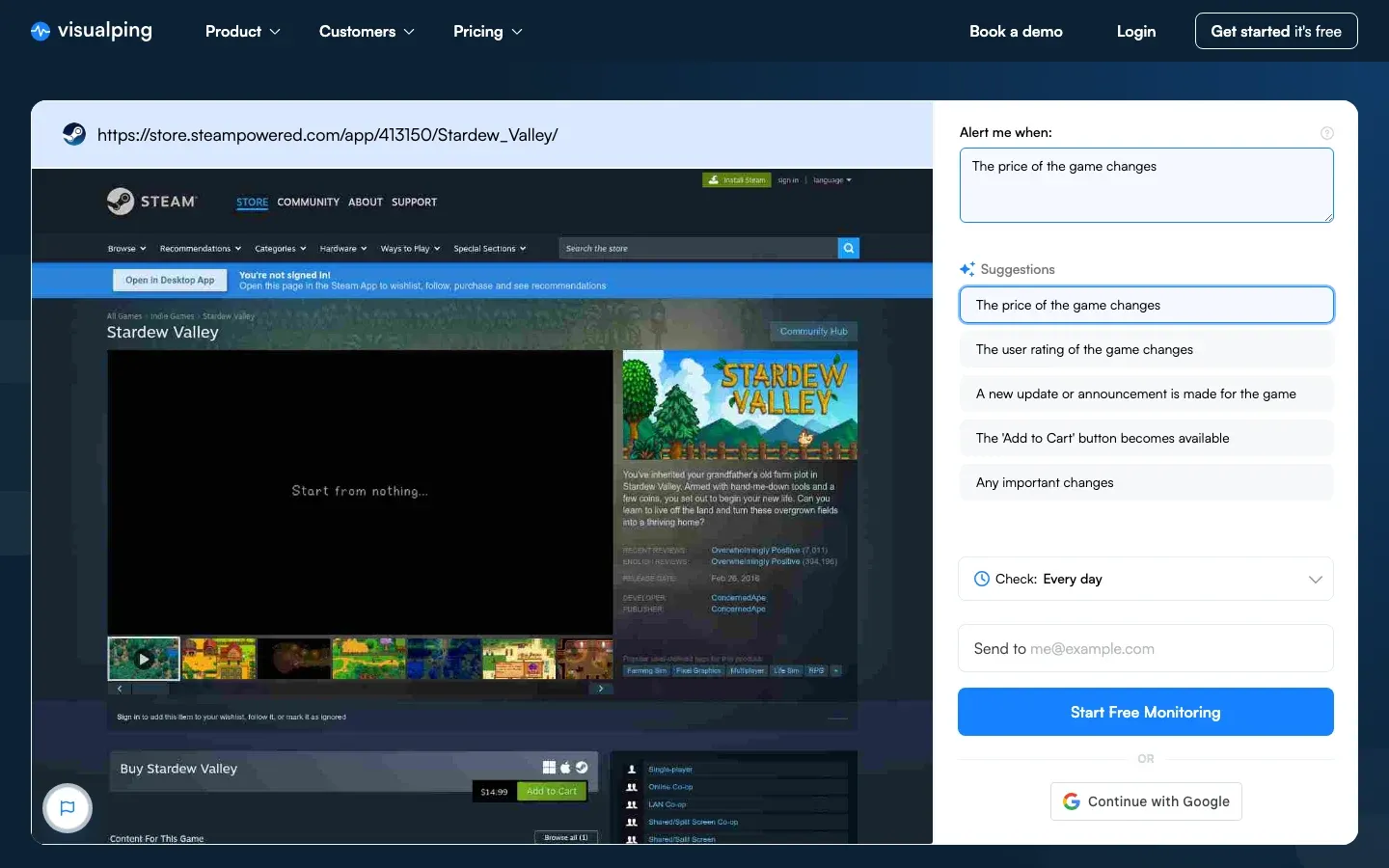 Steam is the most monitored store for sale alerts on Visualping
What people actually monitor for sales
Visualping currently runs 51,575 active monitors on price, sale and deals pages for more than 15,000 customers. Roughly 29% of those pages recorded a change in the last 30 days, and 17% are checked daily or faster.
The distribution is not what most shopping guides assume:
| Store | Active sale monitors | Pages that changed in 30 days |
|---|---|---|
| Steam | 3,892 | 44% |
| Amazon | 382 | 60% |
| Costco | 379 | 18% |
| Best Buy | 82 | 51% |
| Target | 38 | 50% |
| Walmart | 36 | 67% |
Steam is the single most monitored store for sales on the platform, by a wide margin. Game prices move on their own schedule rather than the retail calendar, discounts are steep and time-boxed, and there is no reliable "tell me when this drops" feature built in. That combination is what a page monitor is for.
At the other end, Walmart and Amazon pages change most often (67% and 60%), which means a monitor on those needs a higher check frequency and a tighter selection area to stay useful rather than noisy.
When sales actually happen in 2026
Setting a monitor a few weeks before an event is what catches the real price, because it gives you the pre-event baseline to compare against.
- Prime Big Deal Days, early October. Amazon's autumn event. Prices on some items are raised in the weeks beforehand, so a monitor running from late September tells you whether a "deal" is one.
- Black Friday, 27 November, and Cyber Monday, 30 November. The deepest discounts of the year on electronics. Deals now roll out across most of November rather than landing on the day.
- Steam Autumn and Winter Sales, late November and late December. Steam's own calendar, separate from retail.
- Post-holiday clearance, late December into January. Where seasonal stock and last-generation models get marked down.
Tips for catching the drop
- Monitor the price element, not the page. A tight selection around the price and sale badge cuts false alerts from reviews, recommendations and ad slots.
- Raise the frequency before an event, not after. Daily is fine in October for a Black Friday purchase; move to hourly in the last week.
- Watch more than one listing. The same product often drops at different times across retailers and on the brand's own site.
- Set a threshold instead of watching every change. An AI condition like "alert me when the price drops below $150" removes the noise of small fluctuations.
- Start early enough to learn the normal price. Knowing the pre-sale baseline is the only way to tell a genuine discount from a marked-up one.
Frequently asked questions
How do I get notified when a product goes on sale?
Put a monitor on the product page. Paste the URL into a page monitoring tool, select the area around the price, set a check frequency, and add your email. You get an alert the moment that area changes, regardless of whether the retailer offers its own alert.
Can I get sale alerts for any store?
Yes, if the page is publicly viewable. Page monitors work on any public URL, which covers brand sites, regional retailers and small stores that price tracker extensions do not support.
Is there a free way to get sale notifications?
Visualping has a free tier that covers a small number of pages at a lower check frequency, which is enough for a handful of wishlist items. Faster checks and more pages are on the paid plans.
How often should the monitor check?
Daily is enough for most wishlist items. Move to hourly or faster in the week around a major sale event, and for limited-quantity items where the discount sells out.
Why did my sale alert not fire?
Usually because the selected area did not include the price, or the page loads its price after the initial render. Reselect a tighter box directly around the price, and check that the page shows the price without requiring a login or a location to be set.
What is the difference between a sale alert and a price drop alert?
In practice they overlap. A sale alert usually means a discount event with a badge on the page, while a price drop alert is tied to the number itself falling. Monitoring the price area catches both, because both change the same region of the page.
Start with the one item you keep checking
Sale alerts are worth setting up for anything you would otherwise refresh by hand. Pick the single product you keep going back to, paste its URL, draw a box around the price, and let the monitor watch it.
For more, see our guides to price drop alerts, Amazon price tracking and Steam price tracking.
Get real-time price alerts
Sign up with Visualping to monitor any prices online and get notified of price changes.
Eric Do Couto
Eric Do Couto is the Head of Marketing at Visualping. He leads content strategy, growth operations, and brand positioning for website change detection.
More articles by Eric Do Couto